PUQ Charity Foundation is an Android app that shows where every donation goes. Money received, project spending and supporting documents sit in one place, and only verified records count in the public totals.
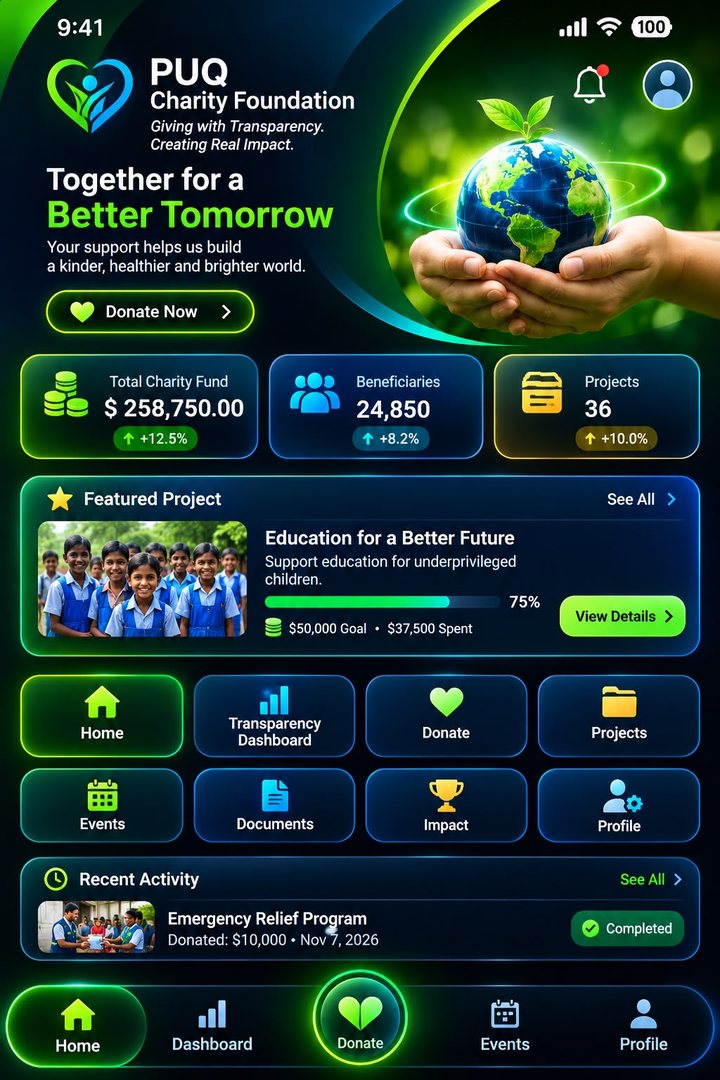
These are the demonstration figures shown in the app. The fund total is the sum of the app’s verified sample income; beneficiaries and projects are demo summary values.
About the app
Every donation is recorded, classified and backed by a document
PUQ Charity Foundation puts a charity’s books in your pocket. Each donation is linked to a project or fund, each expense carries an ID, a reference, a date and a supporting document, and the dashboard shows the result as plain numbers and charts.
Only verified records are countedUnverified records carry an “UNVERIFIED” label and stay out of every public total.
Roles decide who can do whatFinance staff record, auditors verify, project managers manage, and regular users view public information.
Donor privacy is built inAnonymous donors appear as “Anonymous” in public records, and personal data is not published without consent.
Available Fund Balance = Total Verified Income − Total Verified Expenses
1
Money received
All incoming funds are recorded and classified by source: company contribution, public donation, community contribution or special fundraising.
2
Fund allocation
Funds are assigned to verified charity projects, so you can see what each project was allocated.
3
Project expenses
Spending is tracked against invoices and site deliverables, and shown per project against its budget.
4
Documentation
Receipts, invoices and reports are attached to transactions and kept in the Documents library.
5
Verified activities
An auditor or Super Admin verifies each record before it can count in public totals.
6
Public reporting
The Transparency Dashboard, Impact screen and event records publish the verified results.
Try the verification rule
This is the app’s own sample ledger. One income record is still waiting for bank confirmation. Verify it as an auditor and watch the balance change.
Available Fund Balance
$149,250
= Verified income $258,750 − verified expenses $109,500
EXP-2004 • Clean Water for Rural Schools • Invoice INV-0830-B.pdf
−$24,000
Public Donation, pending bank clearingUNVERIFIED
INC-1008 • Ref PUB-1106 • No document attached yet
+$5,000
Every feature
Eleven screens, one transparent system
Pick a screen from the app’s own menu to see what it does and how it works. Everything listed here exists in the Android app today.
Home
The first screen gives you the whole foundation at a glance and a direct path to give.
How it works
The hero shows the logo (tap it for a small bounce), the headline “Together for a Better Tomorrow” and a glowing Donate Now button that opens the Donate screen.
Three stat cards show Total Fund (calculated from verified income), Beneficiaries and Projects, each with a trend badge.
The Featured Project card shows the first project with a progress bar, goal and amount spent, plus a View Details button and a See All link.
Recent Activity shows the latest verified expense with a Completed badge. Tap it to open its supporting document.
Upcoming Events lists the next two upcoming events, and each one opens its detail page.
The header carries a menu button, the notification bell with an unread dot, and a shortcut to your profile.
Navigation everywhere in the app
Side menu with 10 itemsBottom bar: Home, Dashboard, Donate, Events, ProfileCurrent screen highlightedBack button returns step by step
Transparency Dashboard
A financial transparency system with three tabs: Overview, Income and Expenses.
How it works
The Available Fund Balance hero card shows verified income minus verified expenses, and prints the formula under the number.
Six figure cards break down funds received: total received, PUQ Company Contribution, Public Donations, Community Contributions, Special Fundraising, and total amount spent.
The Core Transparency Principle card opens the six stage verified fund flow, from Money Received to Public Reporting.
Charts show Income vs Expense bars, a Fund Distribution donut, and Project-wise Spending bars.
A Monthly Financial Overview table lists income, expense and net for each month.
Recent Transactions open a detail view with ID, reference, date, classification, project, amount, a VERIFIED or UNVERIFIED label and a link to the supporting document.
Sample monthly overview from the app
Month
Income
Expense
Net
Jun 2026
$150,000
$0
$150,000
Jul 2026
$30,000
$0
$30,000
Aug 2026
$25,000
$39,000
−$14,000
Sep 2026
$18,750
$22,500
−$3,750
Oct 2026
$25,000
$38,000
−$13,000
Nov 2026
$10,000
$10,000
$0
Donate
A four step donation form with validation, a PDF receipt and a personal history.
1. Choose a cause
General Donation
Education Support
Emergency Relief
Community Development
Specific Project Donation, with a project picker
2. Amount and currency
Quick amount chips or your own amount, up to 1,000,000.
16 currencies, including USD, EUR, GBP, BDT, INR, JPY, AED and SAR, with an approximate USD value shown.
3. Donor details
Name, and an email or phone number for the receipt.
A Donate Anonymously switch. Anonymous donors show as “Anonymous”.
4. Payment method
Google Pay, Puqet Pay, Paytm, Credit / Debit Card, Mobile Banking (bKash / Nagad), PayPal, or Bank Transfer / Crypto.
After you confirm
You get a receipt screen with a reference number (for example PUQ-20261107-1), the amount paid, approximate USD value and method.
Receipts download as a PDF or share through the Android share sheet. A Recent Donations list keeps your history.
Inputs are checked first: a valid amount, a name unless anonymous, a valid email or phone, and a project when you pick Specific Project Donation.
No payment gateway is connected in this version. A donation is saved on the device as a pledge, nothing is charged, and pledges are not counted as income.
Projects
Discover and track every project, from budget to completion.
How it works
Search by name or location, and filter by category and status (Upcoming, Ongoing, Completed).
Each project card shows its status pill, budget figures and a spending progress bar.
The detail page has general information, objective, location and dates, plus the financial card: total budget, allocated funds, verified expenses, remaining balance and percent spent.
Sections for project documentation (receipts, invoices, reports), photos, event videos and a project timeline (started, activities, completed).
Donate to this project jumps to the Donate form with the project pre-selected, and Save adds it to your Profile.
Sample projects in the app
Project
Status
Spent of budget
Education for a Better Future
Ongoing
$37,500 of $50,000
Clean Water for Rural Schools
Ongoing
$36,000 of $42,500
Mobile Pediatric Health Clinic
Ongoing
$18,000 of $30,000
Emergency Relief Program
Completed
$10,000 of $10,000
Orphan Support Program
Ongoing
$8,000 of $25,000
Youth Skills Workshop
Upcoming
$0 of $15,000
Education & Skills DevelopmentEmergency & Humanitarian ReliefCommunity DevelopmentSocial Support ProgramsHealthcare Support
Events & Activities
Every event is documented, from the plan to the completion report.
How it works
Filter events by category and status. Categories are Charity Distribution, Education Programs, Community Events, Emergency Relief Activities and Fundraising Events.
The event page shows date, location, purpose, description, beneficiaries, total budget, total expenses and balance.
Completed events include an event completion report, for example “300 kits distributed, with receipts filed”.
View public documentary record opens the public record once an event is completed. Before that, the app says the record appears when the event is done.
Share event sends the event details through any app on your phone.
Photos and videos are listed per event. Uploading them needs the planned backend.
Sample events in the app
Annual Charity Gala, 15 Dec 2026Community Health Day, 28 Nov 2026Food Pack Distribution Day, ongoingEducation Kit Handover, completedFlood Relief Camp, completed
Documents
A digital library behind the numbers, with a built-in viewer.
How it works
Search documents by title and filter by category.
The in-app PDF viewer opens documents page by page, and an image viewer shows photos. Faces are shown only with consent.
Download PDF saves the file to your phone’s Downloads folder, in a PUQ Charity folder.
Share text sends the document details through the Android share sheet.
Documents open from anywhere: transaction details, projects, receipts and the Recent Activity card.
Eight document categories
Financial StatementsIncome RecordsExpense ReceiptsProject ReportsEvent ReportsDonation RecordsOfficial Foundation DocumentsAudit Reports
Impact
Verified social impact reporting, shown in numbers and stories.
How it works
Seven impact tiles: Total Beneficiaries, Families Supported, Students Supported, Completed Projects, Education Programs, Emergency Relief Activities and Communities Reached.
A Before & After panel pairs a pending “before” photo slot with the “after” picture of the Education for a Better Future project.
Beneficiary stories are quotes shared with consent.
Project results list each project’s targeted beneficiaries, status and progress, and open the project page.
Sections for activity videos and completion reports, which link to completed events.
Impact figures in this version are demonstration data, clearly labelled DEMO in the app, and are meant to be replaced with verified project data from a backend.
Profile
Your account, your donations and your saved projects in one place.
How it works
Edit profile changes your name, email and phone, with validation. Change photo picks a picture from your phone, which is stored privately inside the app.
A summary shows your pledges made and total pledged in approximate USD, with a member ID.
Donation history & receipts lists every pledge. Open one to see or download its receipt.
Saved projects collects the projects you tapped Save on.
Notification preferences switch on or off: Donation updates, Project progress, Event reminders and Financial reports.
Account information shows your sign-in email and language.
Calls & Activity Logs
A searchable audit trail that combines admin actions, transactions and donations.
How it works
Three counters at the top: Total Logs, Verified and Pending.
Type a keyword, ID, donor name, reference or amount to search.
Filter chips: All Calls & Logs, Audit Actions, Financial Txs, Donations and Pending Verification. Sort by newest or oldest first.
Verified entries have a green border, audit actions a blue one and pending items an amber one. Tap an entry to open its receipt or supporting document.
You reach this screen from the side menu or from the Admin Panel’s audit log.
Settings
Preferences, privacy and security, grouped in clear cards.
Account
Account Settings: edit name, email and phone.
Language Selection: English or Bangla. The choice is saved, and full translation is planned for a later version.
Share anonymised usage statistics (off by default).
Security
Require a 4-digit PIN to open the app. The PIN is stored as a salted hash, never as plain text.
Set or change the PIN at any time.
Support and legal
Help & Support by emailAbout PUQ Charity FoundationTerms & ConditionsPrivacy PolicyAdmin PanelLogout
Admin Panel
Role-based records, verification and an audit log. This is a demo panel for testing permissions.
Six roles
Role
What it can do
Super Admin
Record, verify, manage and handle documents
Finance Administrator
Record income and expenses
Project Manager
Create and manage projects and events
Documentation Manager
Manage documents
Auditor / Reviewer
Verify transactions
Regular User
View public information only
How it works
Record a transaction as income or expense with category, project, description, amount, reference and an optional document name. It saves as UNVERIFIED and is excluded from public totals.
Pending verification lists unverified records. Only an Auditor or Super Admin can verify them.
Create project and Add event forms check names, budgets and dates.
The audit log records every admin action and opens the full Calls & Activity Logs screen.
Roles can be switched freely for testing. A production app needs a secure backend to authenticate administrators and enforce roles.
Built into the whole app
Notifications
The bell shows an unread dot and lists recent pledges, newly verified income and expenses, and how many records await verification.
Sign in or continue as guest
Sign in with an email and a password of at least 6 characters, or continue as a guest. Authentication is a demo in this version.
PIN lock
When enabled, the app asks for your PIN on launch. “Forgot PIN? Sign out” clears the PIN and returns you to sign in.
PDF receipts
Receipts for pledges and transactions are created inside the app as PDFs, which you can view, download or share.
Sharing
Share event details and document information with the Android share sheet. You choose the app.
Works offline
Data is kept on your device in this version, so the app does not need an internet connection to show your information.
See it in action
A look at the app’s screens
The home screen below is the app’s approved design. The other screens are live recreations built from the app’s own layout and sample data, so you can see how they look and try the donation form.
Home
Donate Now, fund statistics, a featured project and recent activity, with the bottom bar always in reach.
Raised neon Donate button in the bottom bar
Notification bell and profile shortcut in the header
Transparency Dashboard
Financial transparency system
OverviewIncomeExpenses
Available Fund Balance
$149,250
= Verified income $258,750 − verified expenses $109,500
Total Funds Received
$258,750
Total Amount Spent
$109,500
PUQ Company
$150,000
Public Donations
$70,000
Income vs Expense
JunJulAugSepOctNov
Fund Distribution
● PUQ Company ● Community ● Public ● Special
Make a Donation
Direct & Transparent Giving
General DonationMOST POPULAR
Flexible funding allocated where help is needed most urgently.
Approx. USD value$100.00
Donate anonymously
Payment method
Google Pay • Puqet Pay • Paytm • Card • bKash / Nagad • PayPal • Bank / Crypto
Demo only. In the app, a donation is saved as a pledge until a payment gateway is connected.
Projects
Discover and track every project
🔍 Search projects, locations…
All statusOngoingCompleted
Education for a Better FutureOngoing
Dhaka • 300 beneficiaries
$37,500 of $50,00075%
Clean Water for Rural SchoolsOngoing
Rajshahi • 4,200 beneficiaries
$36,000 of $42,50085%
Mobile Pediatric Health ClinicOngoing
Sylhet • 2,600 beneficiaries
$18,000 of $30,00060%
Emergency Relief ProgramCompleted
Cox’s Bazar • 850 beneficiaries
$10,000 of $10,000100%
Impact
Verified social impact reporting
24,850
Total Beneficiaries
6,120
Families Supported
3,480
Students Supported
48
Communities Reached
Before & After
BEFORE photo pending
Education for a Better Future: children now receive books, teachers and scholarships.
“I can finally go to school with my own books.”
Student, shared with consent
Settings
Preferences, privacy and security
Account
Account Settings › Language: English / Bangla › Theme: Dark Neon ›
Notification settings
Donation updates
Project progress
Event reminders
Financial reports
Security settings
Require PIN to open the app
Set / change PIN ›
Administration
Admin Panel (DEMO) ›
Android
Get the PUQ Charity Foundation app
Download the APK and install it on your Android phone. No account is needed to look around: you can continue as a guest.



 Home
 Transparency Dashboard
 Donate
 Projects
 Events & Activities
 Documents
 Impact
 Profile
 Calls & Activity Logs